FreakyPutty
By Don Hopkins, Interval Research Corporation
Description
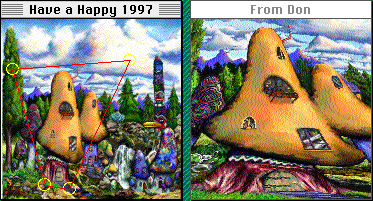
FreakyPutty is a program that continuously and interactively warps
an animated view of a high resolution image. It allows direct dynamic
manipulation of the image warp, defined by four corners that smoothly
bounce around the texture map. You can click on any part of the image,
and drag it around under the cursor, and when you release the button,
it keeps moving in the direction you dragged it. When a corner reaches
the edge of the image, it bounces, so you never see any seams.
The continuously animating smoothly moving display gives the
impression of zooming and panning live video, more than
scaling and scrolling a still image.
Problems
There isn't a fun easy way to view large images on the web.
Most programs that can scale and scroll around large images,
like PhotoShop, XRes, or Live Picture,
are cumbersome, discontinuous, and slow to refresh.
Traditional "web browser" interfaces like NetScape and its ilk
give you a pair of scrollbars to view a large image.
Scroll bars take up lots of screen real estate,
scroll but one axis at a time,
and look very ugly.
NetScape support neither simple "direct manipulation" panning,
like Photoshop's space bar shortcut,
nor any kind of user controlled image scaling.
Solutions
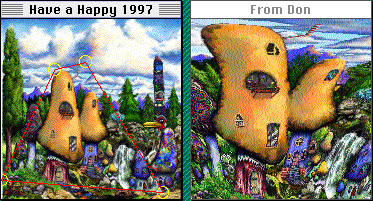
Continuous scrolling and zooming provide a smooth context for navigating
the image, and the dynamic resampling gives still images a live video look.
Each corner of the warped image has a velocity and a gravity that smoothly
moves it around through the texture map, bouncing at the edges, so the image
is always in motion, yet there are never any discontinuities.
Direct manipulation gives you the feel of stretching an image on silly putty.
You can click on any part of the image and drag it around under the cursor,
and when you release the button while moving, the image keeps on going,
bouncing with gravity in the direction you threw it.
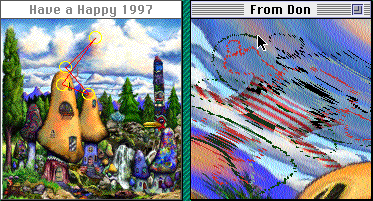
A simple painting function allows you to vandalize fine art, making your
mark in a satisfying but harmless way. You can press down the "Caps Lock"
key, and the cursor will draw colored pixels into the moving image below.
You can press "Control" to set the drawing color to the pixel under the
cursor. You don't even need to move the mouse or hold down the button,
to draw all over the image as it bounces around! Even couch potatos can
be graphiti artists!
Applications
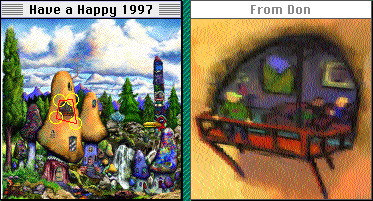
FreakyPutty would be useful as a NetScape plug-in or an ActiveX Control,
that let you easily zoom around and enjoy large images on the web.
You could use it to closely examine and more fully appreciate large images.
It would be an interesting way to display fine art as a screen saver.
Various constraints and affordances could be applied to the user interface,
to make amusing visual direct manipulation toys and puzzles. I can imagine a
game like an easter egg hunt, that lets you fly around a living texture map,
finding special animations, active art supplies, magic regions and power-ups,
with fun and exciting effects on the visual display and user interface.
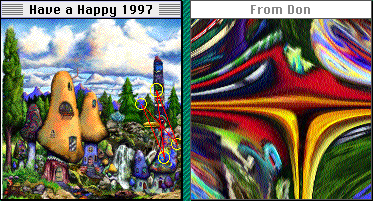
Features
FreakyPutty combines 3D perspective texture mapping with
a quick error diffusion dither, to continuously animate a
smoothly scrolling view of a very high resolution image.
It dithers to an 8 bit indexed color or 16 bit direct color displays,
and also supports 24 bit color display without dithering.
As a trade-off for speed,
the errors are simply diffused to the next pixel in scan line order,
instead of the carefully weighted multidirectional distribution
of the Floyd-Steinburg dither.
The error terms are randomized each scan line,
to break up the temporal correlation of the diffusion wrinkles
from frame to frame.
The intent was to get more apparent resolution be re-sampling the image
slightly differently each frame. The perspective warping is wiggled a little
bit from frame to frame, so that the edges same place, but the interior between
them jiggles slightly like jello. This gives it more of the desired "live video"
effect of a handheld camera, or looking out of someone's eyes (who's a little
drunk or what have you).
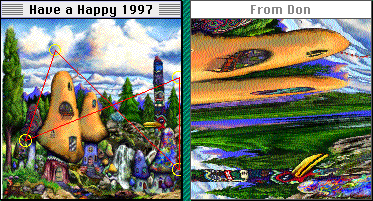
Implementation
The essential FreakyPutty effect could be implemented easily with
3D graphics hardware or libraries.
Simply use 3D graphics texture mapping hardware to continuously warp
and display a 2D texture map on a single polygon.
Some 3D graphics hardware has limitations, like texture map size,
that you could get around by tiling.
Some high performance 3D graphics libraries don't have limitations on
texture map size.
Paul Haeberli and Mark Segal have written a very interesting article called
Texture Mapping as a Fundamental Drawing Primitive
that describes many interesting things you can do with texture mapping,
which is supported by SGI hardware.
There are advantages to implementing FreakyPutty in software,
like supporting custom rendering effects such as motion blur or transparency,
efficiently animating the texture map, and making trade-offs and optimizations
for speed.
3D graphics hardware may be either too specialized or general purpose,
while special purpose software can be written to directly implement the
requirements of the application.
The more advanced Doom-like games use custom high performance software
3D engines, that support special rendering effects unlikely to be
implemented by general purpose hardware, by making trade-offs appropriate
for the game. For example, Magic Carpet gets away with non-perspective,
affine texture mapping, which eliminates the division in the inner loop.
With the extra computrons that frees up, it implements atmospheric
lighting effects, reflective water, and translucent overlays.
Kai Power Goo lets you directly edit displacement maps,
that warp the image without mushing it up. Kai Power Tools 3.0
has some distortion filters like Video Feedback and Vortex Tiling,
that allow you to directly manipulate the warping by grabbing
the image and dragging it around.
They are extremely fun and satisfying,
and inspired the design of FreakyPutty.
References
- Kai Power Goo.
Direct manipulation of displacement maps.
- Kai Power Tools 3.0.
Vortex Tiling, Video Feedback, etc.
Direct manipulation of image distortions.
- Computer Graphics: Principles and Practice.
Foley, van Damm, Feiner, and Hughs.
3D graphics, texture mapping, error diffusion dithering, etc.
- Cutting Edge 3D Game Programming with C++.
John De Goes. Coriolis Group Books. ISBN 1-883577-70-5.
programming book, perspective texture mapping
- Texture Mapping as a Fundamental Drawing Primitive.
http://www.sgi.com/grafica/texmap/index.html.
Paul Haeberli and Mark Segal.
- Independent JPEG Group's software JPEG implementation.
JPEG file importer, colormap quantization, error diffusion dithering.